2 Minute Read
One little caveat: this specific example only works if you’re in New Zealand. Not in New Zealand? Ask your local library if your card includes a free Lynda membership. Your library doesn’t offer that? Apply for a digital library card from New York City Libraries through their website and get access to Lynda.
Backstory
We were living in Wellington and wanted to check out some books from their wonderful libraries. We asked around and they said it was no problem. All we really needed to do was provide proof of our residence in the city. We should, they said, just mail a letter to ourselves so we can prove we are receiving mail somewhere.
How to Get a Free Lynda Membership
The first thing you need to do is prove your residence in New Zealand. Even though a library employee told us to mail a simple letter to ourselves, we were given a little static about the how official the handwritten letter was. After a little convincing he ended up going through with the process but he suggested bringing in the a package/parcel (maybe something you bought from Trade Me) with an order slip it in if we ever needed to prove our residence again.
Secondly, take the letter, or other piece of mail with your address on it, to the library with your home government identification. Driver’s license works great, passports are good, too.
Get your library card! It’s that easy! Once you have your card you can…
- Go to Lynda.com and click Sign In.
- Click “Sign in with your organization portal”
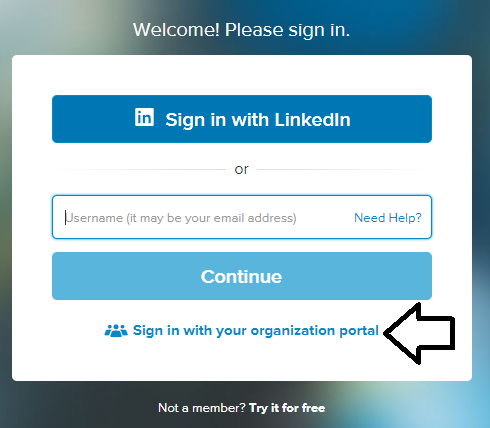
- Then, in the URL box type in: www.wcl.govt.nz and click Continue.
- Next, enter your new library card number and then your last name (surname) for the Library Card Pin.
- Finally, enjoy your free Lynda membership!
The library is a great place to get work done, study, learn on Lynda.com, and, of course, read! Stop by your local library today.


Very neat and useful info. Thanks for sharing!
You’re welcome 🙂